BSO Sheriff Inmate Search & Broward Arrest Records
If someone was arrested in Fort Lauderdale, Hollywood, Pompano Beach, Deerfield Beach, Coral Springs, Miramar, Davie, Sunrise or anywhere in Broward County, the first job is to confirm whether the person is in BSO custody. This guide gives you a direct path to use the official Broward Sheriff’s Office search, check release status, verify bond, look up court dates, request records and avoid outdated third-party arrest pages.
Start with the official Broward Sheriff’s Office website, then open the official BSO Arrest Search. If the person does not appear, check the BSO release log, call the jail information line, then use Broward Clerk case search for court details. This order helps you avoid outdated mugshot pages and paid lookup websites.
Start here before searching BSO jail records
Most users searching “BSO inmate search” need one of these answers: Is the person in custody? What is the arrest number? What are the charges? Is there a bond? Has the person been released? What is the court date? Which facility is holding them? The sections below answer each question in the right order.
Use the official BSO Arrest Search first. Search by last name and match the person carefully before taking action.
If the inmate disappears from search results, check the official release log and then check court or state custody sources.
Use Broward Clerk case search for hearing dates, case filings, court location, disposition and official records.
Start here: official BSO links and steps
The official link should be part of the search process, not only a reference. Follow these steps so you know exactly which page to open and what to do after clicking.
-
Step 1: Open the official Broward Sheriff’s Office website.
Start with the official BSO website when you need agency information, detention services, public safety contacts, records routes or official jail tools. -
Step 2: Open the official BSO Arrest Search.
Use this page for Broward County inmate search, recent arrest lookup, booking details, charge details, bond information and current status. The screenshot below is only a helpful visual reference so users can recognize where to begin; always use the live official page for current results.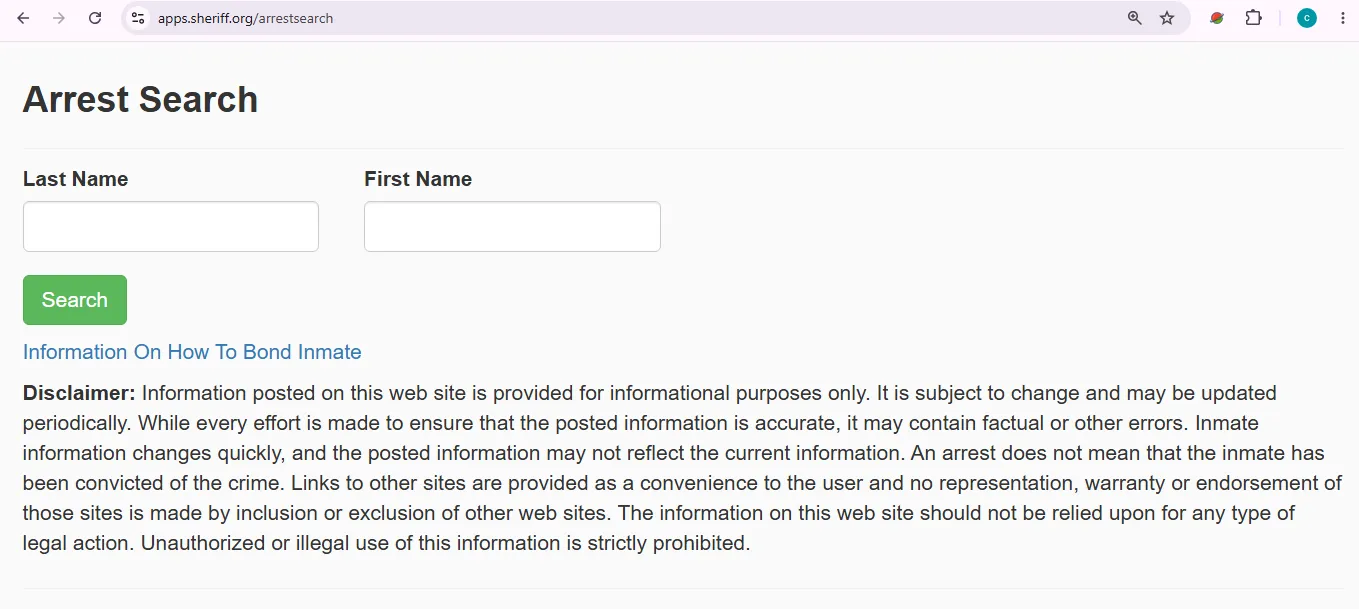
Visual reference for users opening the BSO Arrest Search page. Use the official live page for current Broward arrest and inmate search results. Image description: This image helps users recognize the BSO Arrest Search starting point and understand where to begin a Broward County inmate or arrest lookup. It is a user-help visual reference, not proof of live custody status or an official record copy. -
Step 3: Check the BSO release log if the inmate is not showing.
If the person appeared earlier but is now missing from the arrest search, they may have been released, transferred or updated in the release system. -
Step 4: Check Broward Clerk court records.
Jail records explain custody. Court records are better for case number, hearing date, judge, filings, court division and final disposition. -
Step 5: Use the official public-record request route for reports.
If you need a police report, arrest report, incident record, 911 record or public document, use an official records request route rather than screenshotting private websites. -
Step 6: Call when custody, bond or release is urgent.
For a same-day arrest, release, transport, bond change, missing listing or confusing result, call before visiting, paying money or sending funds.Jail information line: (954) 831-5900
Main jail map reference: 555 SE 1st Ave, Fort Lauderdale, FL 33301
BSO inmate search: simple step-by-step guide
Use this process when you need to find someone in Broward County custody quickly and safely.
-
Open the official BSO Arrest Search first.
Do not start with a paid background-check site. The official BSO search is the best first stop for current Broward arrest and jail information. -
Search by last name first.
Start with the last name only. Add first name after you see too many results. This reduces missed records caused by spelling or middle-name differences. -
Open the matching record carefully.
Compare full name, date of birth or age if shown, arrest number, booking date, facility, charges, bond and custody status. -
Save the arrest number or booking details.
You may need the arrest number for calls, bond, court search, jail services, release alerts, commissary, records request and attorney contact. -
Check the release log before assuming the search is wrong.
If a person no longer appears in custody, the release log may show that the person has already left BSO custody. -
Use Broward Clerk for the legal case.
Jail search gives custody details. Broward Clerk records give better answers for court date, case status, filings and disposition.
If the BSO inmate search shows no result
No result does not always mean the person was not arrested. In Broward County, it may mean the booking is too new, the person was released, the name was entered differently, the person is in juvenile custody, or the person moved to another custody system.
Problem |
Why it happens |
What to do next |
|---|---|---|
Fresh arrest not showing |
Booking, fingerprinting, medical screening or data update may still be processing. |
Search again later and call (954) 831-5900 if custody is urgent. |
Name search fails |
Spelling, hyphen, suffix, alias, nickname, middle name or data-entry difference. |
Search last name only, then try partial spelling or alternate name versions. |
Person was released |
Bond, court order, time served, no-file decision or release processing may remove the person from current custody. |
Check the BSO release log and then Broward Clerk for court case status. |
Wrong county or outside hold |
The arrest may involve Palm Beach, Miami-Dade, federal custody, Florida DOC, or another agency hold. |
Check nearby county search guides, Florida DOC, VINELink and BOP if the person is not in BSO custody. |
Bond, release and Broward court date checklist
Bond and release details can change quickly after first appearance, new charges, warrant checks, probation holds, immigration holds or court updates. Always confirm with official BSO and Broward Clerk sources before paying money.
-
Check the BSO arrest record first.
Look for arrest number, charges, bond amount, status, facility and booking date. -
Confirm bond before paying.
Call BSO or the court if you are unsure about bond amount, cash-only status, payment method or release timing. -
Check Broward Clerk for court movement.
Court records can show case number, hearing date, judge, division, filings and case status. -
Save every receipt and record number.
Keep the arrest number, case number, bond receipt, staff name and time/date of calls.
BSO visitation, phone, commissary, mail and release alerts
Before you schedule a visit, deposit money, send mail or set up calls, confirm the person is still in BSO custody and check the current facility. BSO operates a large detention system, and the current housing location matters.
Check the current BSO instructions before visiting. Rules can change by facility, custody status and security needs.
Never send money until you confirm the inmate is still in custody and you have the correct arrest number or booking details.
Use VINELink when available so you can receive custody change notifications instead of checking manually all day.
Task |
Best source |
Practical note |
|---|---|---|
Schedule a visit |
BSO inmate/visitor information |
Confirm the exact facility and current rules before traveling. Bring valid ID if visiting in person. |
Send money |
BSO custody record and approved deposit provider |
Check custody first. Save transaction number, receipt and support contact. |
Send mail |
Current facility mail rules |
Use full legal name, arrest number if required, facility address and your full return address. |
Phone calls |
Approved jail phone provider |
Calls may be monitored or recorded. Avoid discussing legal facts about the case. |
Release notification |
Register with the name or custody details after you confirm the right person. |
Broward arrest records and public records request guide
A BSO arrest search record is not the same as a complete police report or court document. For complete records, use the correct official records route and prepare exact details before submitting your request.
Record needed |
Best source |
Details to prepare |
|---|---|---|
Current arrest / jail record |
BSO Arrest Search |
Full name, date of birth if known, arrest number, booking date and charge details. |
Police report or incident report |
BSO / Broward public records request route |
Date, time, location, report number, agency, involved names and your contact details. |
Court case document |
Broward Clerk of Courts |
Case number, party name, court division, filing date and document type. |
State criminal history |
Florida Department of Law Enforcement |
Legal name and identifying information required by FDLE. |
If the person moved from BSO custody
If the person does not show in BSO custody, check whether they were released, moved to Florida state custody, moved to federal custody, held in another county, or listed in a notification system.
Use VINELink for custody notifications where available after you identify the correct person.
Use this if the person may have moved from county jail to Florida state prison custody.
Use this only if the person may be in federal custody instead of a county jail.
Real insider tips for Broward County families
These practical checks help you avoid wrong records, wasted calls and bad payments when dealing with a Broward arrest, bond, court date, jail service or records request.
BSO contact and Broward Main Jail location
Use the official contact details below as a starting point, then verify the current facility, office hours and instructions before visiting.
Agency |
Broward Sheriff’s Office / Department of Detention |
Jail information line |
(954) 831-5900 |
Main jail map reference |
555 SE 1st Ave, Fort Lauderdale, FL 33301 |
Official BSO website |
|
Official arrest search |
|
Broward Clerk main office |
Use Broward Clerk official website for current court office, case search, public records and document request information. |
Frequently asked questions
These quick answers cover common BSO inmate search, Broward jail roster, arrest record, bond, release, court and public records questions.
How do I search for an inmate with BSO?
Open the official Broward Sheriff’s Office website first, then use the official BSO Arrest Search. Search by last name and compare the record carefully before taking action.
Is the BSO Arrest Search free?
Yes. Start with the official BSO Arrest Search before paying any private inmate search, mugshot or background-check website.
What phone number should I call for Broward jail information?
Use the BSO jail information line at (954) 831-5900 when online information is missing, unclear or urgent.
Where is the Broward Main Jail located?
The common Main Jail map reference is 555 SE 1st Ave, Fort Lauderdale, FL 33301. Always verify the current facility before visiting because BSO may house inmates in different detention facilities.
Why can’t I find someone in the BSO inmate search?
The arrest may be too new, the name may be spelled differently, the person may have been released, or the person may be in another county, Florida DOC, federal custody or juvenile custody.
How do I check if someone was released from BSO custody?
Use the official BSO release log and then check Broward Clerk court records if you need the related case status.
How do I check a Broward court date?
Use Broward Clerk case search. Court records are better than jail records for case number, hearing date, filings, division and disposition.
How do I request Broward arrest records or police reports?
Use the official Broward public-record request route or the proper BSO records process. Prepare name, date, location, report number, arrest number and your contact details.
Can I trust private Broward mugshot websites?
Use them carefully. Private sites may be outdated, incomplete or paid. Always verify custody, charges, release and court status through official BSO and Broward Clerk sources.
What is the difference between BSO jail and Florida state prison?
BSO jail is for county custody, pretrial detention and shorter local custody situations. Florida DOC custody is for state prison sentences after conviction and sentencing.
This guide was prepared as an independent user-help article using official BSO, Broward Clerk, public-record and custody-search sources. Jail links, bond instructions, release information, phone numbers, facility details and records procedures can change, so users should verify urgent details directly with the official office before visiting, paying money or sending mail.
Find Jail Info, Inmate Search Steps, Visitation Rules, Bond Help, Warrants and Official Sheriff Links
Use this free tool before calling a sheriff office, searching a jail roster, checking arrest records, visiting an inmate, asking about bond, requesting a report, or looking for official county sheriff resources. It does not collect names, case numbers, booking numbers, or personal information.
What sheriff office task do you need help with?
Choose your situation. The tool will suggest the safest next step, what to prepare, and which official resource to check first.
Start with the official sheriff or jail roster, confirm custody by phone only when needed, then check court records for hearings or case details.
Do not pay anyone who calls demanding gift cards, crypto, wire transfers, or urgent warrant payment. Verify through official sheriff channels.
Inmate Search Step Helper
Use this before searching a jail roster or inmate lookup portal. It helps you choose the best search method and avoid wrong-person matches.
Bond, Release and Custody Status Helper
Use this to organize what to check before asking about bond, release timing, facility location or court status.
Visitation, Phone and Mail Checklist
Use this before planning a jail visit, video visit, inmate phone setup, commissary deposit, or mail delivery.
Warrant Information Safety Helper
Use this if you are trying to understand warrant information safely. This tool does not confirm warrants and does not provide legal advice.
Sheriff Report and Arrest Record Request Helper
Use this before requesting accident reports, incident reports, arrest records, jail records, public records or background-related information.
Sheriff Call / Warrant Payment Scam Checker
Use this if someone called, texted, emailed or messaged you claiming to be from a sheriff office, court, jail, deputy or warrant unit.
Official Sheriff Office Resource Finder
Enter county and state to create safe searches for official sheriff websites, jail rosters, inmate lookup, warrants, visitation, records requests, court records and this site’s guide.
Sheriff Office vs Court vs Jail
- Sheriff/Jail: custody, booking, jail roster, visitation, inmate mail, some warrants.
- Court/Clerk: case status, hearings, court records, fines, court dates.
- Attorney: legal advice, warrant risk, criminal charges, bond strategy.
Best sitewide placement
Add this tool after the first inmate-search or contact section, or before FAQs. It turns a normal guide into a practical action page.
Important safety note
This tool is educational only. It is not a sheriff office, jail, court, legal service, emergency service, or official records portal. For emergencies, call 911.